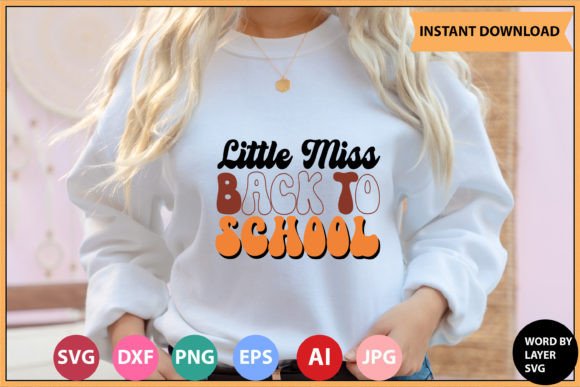
Little Miss Back to School RETRO DESIGN
The Little Miss Back to School RETRO DESIGN is more than a nostalgic graphic—it’s a versatile, production-ready digital asset built for intentionality. Designed with layered typography and authentic 70s–90s school-day aesthetics—think chalkboard textures, hand-drawn outlines, and warm, muted palettes—it bridges emotional resonance with functional precision. For creators who value both visual storytelling and technical flexibility, this design delivers strategic utility across physical products, digital campaigns, classroom resources, and brand extensions.
What You Receive—and Why File Diversity Matters Strategically
Your purchase delivers a single .zip file containing six distinct, professionally prepared file types—each serving a specific role in your workflow:
- 1 SVG File (Word By Layer): Fully compatible with Cricut Design Space, this version separates each word or phrase into its own layer—enabling precise resizing, color assignment, or selective hiding without distortion. Ideal when you need to adapt the design for vinyl decals, t-shirts, or laminated classroom posters where individual elements must scale independently.
- 1 EPS File: A vector format that retains infinite scalability and full editability in any vector-based application. Use it when collaborating with print vendors or integrating into larger layouts where resolution independence is non-negotiable.
- 1 PNG File (300 DPI, Transparent Background): Optimized for web use, social media banners, digital newsletters, or PowerPoint slides. The high-resolution transparency means no white boxes or awkward edges—just clean placement over photos, gradients, or branded backgrounds.
- 1 DXF File: Engineered for CNC routers, laser cutters, and AutoCAD workflows. If you’re producing wooden signs, acrylic desk plaques, or custom-cut bulletin board frames, this file ensures mechanical accuracy and toolpath compatibility.
- 1 AI File (Adobe Illustrator Source): The editable master. Every stroke, anchor point, and text object remains live and modifiable. Essential if you plan to rebrand the design—swap fonts, adjust spacing for bilingual versions, or integrate school logos without starting from scratch.
- 1 JPEG File: A ready-to-use, high-fidelity preview for client presentations, mockups, or quick social posts—no software required to view or share.
This breadth isn’t about redundancy—it’s about reducing friction between concept and execution. When your goal is speed *and* fidelity—whether launching a back-to-school merch line in 48 hours or preparing differentiated learning materials for a multi-grade classroom—the right file type at the right time preserves quality while cutting revision cycles.
When This Design Adds Real Value—Not Just Visual Flavor
Strategic use of the Little Miss Back to School RETRO DESIGN begins with alignment—not aesthetics alone. Consider these grounded use cases:
- Educators building classroom culture: Print the SVG on matte laminate, cut out individual words (“Curious,” “Brave,” “Ready”), and mount them on a hallway wall as growth-mindset anchors. Because each word is layered, students can rearrange them weekly—turning decor into an interactive routine.
- Small business owners launching seasonal offers: Insert the PNG into Canva, overlay a limited-time discount code, and deploy across Instagram Stories and email headers. The retro warmth softens promotional messaging—making “20% off supplies” feel supportive, not transactional.
- Freelance designers developing brand systems for tutoring services: Open the AI file, replace “Back to School” with the client’s name, adjust color values to match their existing palette, and export new variants for worksheets, Zoom backgrounds, and parent welcome packets—all within one consistent visual language.
- Hobbyists creating personalized gifts: Load the DXF into LightBurn, pair it with birch plywood, and produce engraved pencil holders or notebook covers. The retro tone signals thoughtfulness; the precision ensures durability.
In each case, the design serves as infrastructure—not decoration. It accelerates delivery, reinforces voice, and scales across touchpoints without dilution.
What to Consider Before You Download—and Deploy
Even high-quality assets require context to deliver ROI. Ask yourself these questions before integrating the Little Miss Back to School RETRO DESIGN:
- Is the retro tone aligned with your audience’s expectations—or could it unintentionally signal “outdated”? Teachers in progressive STEM programs may prefer clean, modern typography; homeschool communities often embrace nostalgic warmth. Match aesthetic intent to perceived credibility.
- Do you have the tools—or access—to leverage all six files? If you only use Cricut Design Space, the EPS and DXF add little immediate value—but they future-proof your investment if your workflow expands.
- Will this support a repeatable system—or is it a one-off? If you plan annual back-to-school campaigns, save the AI file as a template: create layers for year, grade level, and call-to-action so next August requires only three clicks—not redesign.
- Are usage rights clear for your intended channel? This is a digital download for personal and commercial use—but verify whether redistribution (e.g., bundling into a paid Canva template shop) falls within scope. Clarity here prevents operational risk later.
Without those considerations, even the most polished design risks becoming shelfware—downloaded, admired, then buried under newer files.
Avoiding the “Just Because It’s Cute” Trap
Many creators download retro designs impulsively—drawn to charm rather than function. That leads to inconsistent branding, mismatched applications, or rushed edits that compromise legibility (especially at small sizes). The Little Miss Back to School RETRO DESIGN avoids that pitfall by offering true layer control: you’re not stuck with a fixed composition. But that power demands discipline.
Before inserting it into a project, pause and define the outcome you want. Is it to reassure parents about a structured learning environment? Then emphasize the “Back to School” phrase in large, centered SVG format on a welcome letter. Is it to energize students? Use the PNG in a slide deck with animated entrance effects on each word—“Little,” “Miss,” “Back,” “to,” “School”—building anticipation.
Random application weakens recognition. Intentional sequencing builds memory.
Long-Term Positioning: Beyond the First Download
Treat this design not as a static image but as a modular component in your creative inventory. Save versions with intentional variations: one with “First Day Jitters” swapped in, another with “Welcome Back, Scholars!” in the same font family and spacing logic. Over time, you’ll build a mini-retro toolkit—consistent in tone, flexible in message, efficient in execution.
That approach supports long-term goals: faster campaign turnarounds, stronger visual continuity across years, and reduced decision fatigue during seasonal planning. It also positions you as someone who thinks in systems—not just assets.
For educators documenting student progress, the layered SVG allows annotation directly in PDF editors—adding names, dates, or goals to printed versions without altering the base design. For bloggers reviewing educational tools, the transparent PNG integrates cleanly into comparison tables or roundup graphics—enhancing clarity, not competing with content.
Ultimately, the Little Miss Back to School RETRO DESIGN earns its place when it removes barriers between intention and impact—when it helps you communicate more clearly, produce more reliably, and connect more authentically. That happens not because it looks good, but because it’s engineered to work well, across contexts, over time.