BACK to SCHOOL WORD SEARCH - VOL 4
If you've ever spent hours formatting puzzles for a classroom handout, scrambled to find print-ready activities before the first bell rings, or tried to repurpose the same old worksheet across multiple grade levels—BACK to SCHOOL WORD SEARCH - VOL 4 is built for moments like those. It’s not just another puzzle pack. It’s a time-tested, print-and-go interior designed specifically for creators, educators, and small-business owners who need reliable, adaptable, and classroom-ready content—without the overhead.
What Exactly Is BACK to SCHOOL WORD SEARCH - VOL 4?
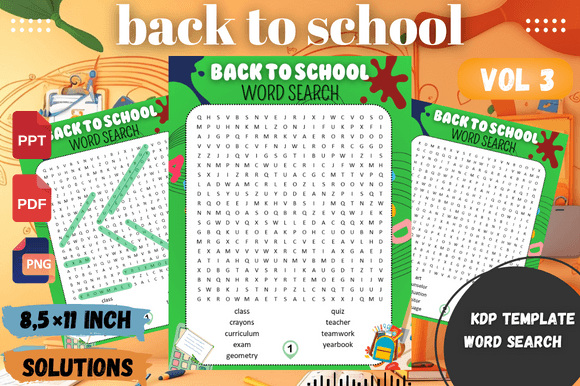
This is a professionally crafted, KDP-optimized interior file—9 pages of original word search puzzles themed around back-to-school vocabulary: notebook, homework, teacher, cafeteria, schedule, locker, and more. Each puzzle is laid out on crisp 8.5” x 11” pages with clear fonts, generous spacing, and thoughtful difficulty progression—from early elementary-friendly grids to slightly denser layouts that challenge upper-grade students or adult learners.
The full package includes 18 total pages: 9 puzzle pages + 9 solution pages (one per puzzle), all delivered in high-resolution PNG, PDF, and editable PPT formats. That means you’re not locked into one use case—you can drop a puzzle into a teacher newsletter as a PNG, embed it in a digital lesson plan via PowerPoint, or scale it for large-print classroom posters using the vector-friendly PDF.
Where This Word Search Fits Into Real Life—Not Just Theory
Think beyond “filler activity.” Here’s where BACK to SCHOOL WORD SEARCH - VOL 4 quietly solves real problems:
- Classroom teachers use it during the first week to ease transitions—students settle in while reinforcing school routines and vocabulary. One 4th-grade teacher told us she prints two copies: one laminated for early-finishers at a station, and one as a take-home “get-to-know-your-classroom” sheet with space for kids to draw their ideal desk setup beside the puzzle.
- Homeschool parents layer it into unit studies: pair the “library” puzzle with a visit to the local branch, or use the “science lab” grid before a kitchen-based experiment. Because the files are editable, they’ve added custom words like their child’s name, pet’s name, or even “backpack snack” to boost engagement.
- Tutoring centers and after-school programs rely on it as a low-prep warm-up. Instead of re-teaching spelling rules every session, they start with a puzzle—and then ask students to circle three words they *almost* misspelled, explaining why. It surfaces misconceptions fast, without pressure.
- KDP publishers build entire activity bundles around it—adding mazes, coloring pages, and reflection prompts—but keep the core word search intact because buyers consistently rate these as the most-used pages in their workbooks. The clean interior means fewer customer complaints about blurry text or misaligned grids.
- ESL instructors use the answer keys to spark conversation: “Why do we say ‘homework’ not ‘home work’?” or “What’s the difference between ‘principal’ and ‘principle’?” The puzzles become springboards—not endpoints.
Who Benefits—and How Their Needs Differ
A middle-school special ed teacher doesn’t need the same thing as a graphic designer launching a back-to-school planner on Etsy—but both get value from this interior. The teacher needs clarity, consistency, and zero printing surprises. The designer needs flexibility: to recolor headers, adjust margins for bleed, or swap in bilingual terms. And because BACK to SCHOOL WORD SEARCH - VOL 4 ships with layered PPT files (not flattened images), both can do exactly that—no design software required.
Small business owners running summer camps report using the puzzles in two unexpected ways: as part of staff orientation (“Find the 5 things that make our camp culture unique”) and as parent-facing “first-day prep” handouts mailed ahead of enrollment. The familiarity of the format lowers anxiety—for adults and kids alike.
Things to Keep in Mind Before You Use It
While it’s designed for broad usability, here are practical considerations worth noting:
- It’s interior-only. No cover, no branding, no copyright page—just clean, ready-to-assemble puzzle pages. That’s intentional: it gives you full control over tone, audience, and positioning. But if you’re new to KDP, you’ll need to create or source those other elements separately.
- No auto-generated answer keys. Solutions are included—but they’re static pages, not algorithmically generated. That ensures accuracy (no typos hiding in hidden words), but also means you can’t randomize answers on the fly. For most users, that’s a feature—not a limitation.
- Fonts are embedded and print-safe, but if you edit heavily in PowerPoint, avoid replacing the default font with decorative ones at small sizes—they reduce readability for younger readers or dyslexic learners.
- It’s not adaptive learning software. There’s no scoring, timing, or progress tracking. But many users pair it with simple analog systems: a sticker chart for completed puzzles, or a “word wall” where students add new vocabulary they discovered in the grid.
Why “High-Resolution Print Ready” Actually Matters
You’ve probably downloaded free printables only to discover faint lines, pixelated letters, or margins that vanish when printed. BACK to SCHOOL WORD SEARCH - VOL 4 avoids those pitfalls by rendering at 300 DPI, using CMYK-safe colors, and testing each page across common home printers and commercial copiers. One user shared that she ordered a physical proof copy from KDP—and every puzzle was sharp, centered, and fully legible, even when scaled to 125% for her student with low vision.
That reliability saves more than time. It builds trust—with your students, your buyers, and your own workflow. When a puzzle works the first time, every time, you stop troubleshooting and start teaching, creating, or selling.
Real Talk About Flexibility
Yes, it’s editable—but not in the way some templates promise. You won’t find “drag-and-drop word banks” or AI-powered customization. What you *will* find is clean, labeled layers in PowerPoint: separate text boxes for titles, instructions, grids, and solutions. Change a word? Click and type. Adjust column width? Drag the border. Repurpose Puzzle #3 as a “First-Day-of-Fall” version? Duplicate the slide and swap six terms. It’s human-centered editing—not wizard-driven magic.
That balance—between polish and practicality—is why educators return to BACK to SCHOOL WORD SEARCH - VOL 4 year after year. It doesn’t try to do everything. It does one thing exceptionally well: help people show up prepared, confident, and ready to connect—whether that’s with a room full of 7-year-olds, a stack of KDP proofs, or a group of nervous new hires on their first Monday.